Web Dashboard Overview
The web dashboard is where dispatchers and managers run the daily operation. Use it to take in packages, see the plan for each driver, and manage the fleet, the team and the territories.
This section tells you what each part of the dashboard does. Each page has screenshots of the real application and short procedures.
The dashboard at a glance
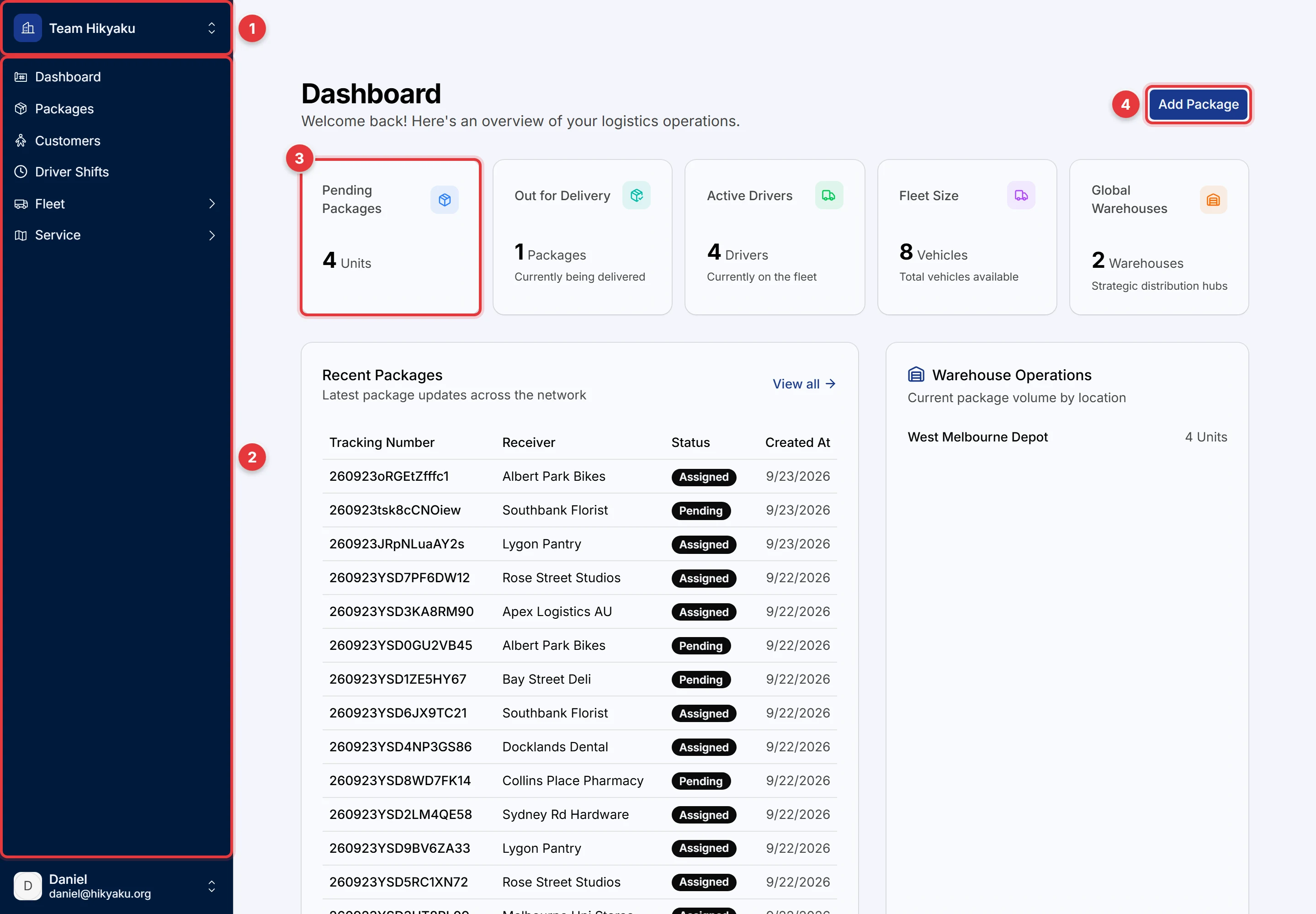
- Organisation switcher. Click it to change to a different organisation, or to make a new one. All data in the dashboard belongs to the organisation that you select here.
- Sidebar. Use it to go to each part of the dashboard. Click Fleet or Service to show their pages.
- Summary cards. They show the number of pending packages, packages out for delivery, active drivers, vehicles and warehouses.
- Add Package. Click it to take in a new package.
Below the cards, Recent Packages shows the latest packages and their status. Warehouse Operations shows the number of packages at each warehouse. Today's Shifts shows the shifts for today.
Features
| Feature | What you can do | Page |
|---|---|---|
| Packages | Take in packages, print labels, follow each package from pending to delivered, and see why Hikyaku put it on a shift. | Packages |
| Customers | Keep the senders and receivers, with addresses that Hikyaku checks on the map. | Customers |
| Driver Shifts | See the plan for each driver on a weekly calendar, make a shift manually, change the stop sequence, and re-optimise. | Driver Shifts |
| Vehicles and skills | Keep a record of each vehicle, its capacity and its capabilities, for example refrigeration. | Vehicles and Skills |
| Team members and drivers | Add people, set their access, and see each driver's licence, territories, limits and location history. | Team Members and Drivers |
| Driving limits | Set how long, how far and how many stops a driver's shift can have. | Driving Limits |
| Service areas | Draw the territories that your drivers cover. | Service Areas |
| Warehouses | Keep the depots where shifts start and end. | Warehouses |
| Settings | Change your account, two-factor authentication, billing, branding and connected apps. | Settings |
How the parts work together
When you add a package, Hikyaku puts it on a shift immediately. It selects the shift from the drivers, vans, skills, limits and territories that you set up. For the full rules, refer to Dispatch and Operations. Drivers then run the shift in the driver app.
Access to the dashboard
Each person sees only the pages that their permissions allow. A button that you cannot use is grey. Put the pointer on it to see which permission is necessary. For the full list of permissions, refer to Access Control.